

If you offer free print delivery for some postal codes, but for others, you’d like to charge, see this help doc.
You can set this up with two plans: a free plan for your local postal codes, and a paid plan for every other address. PaywallProject checks the postal code of the reader’s delivery address and only lets them take the plan that fits.
Readers find out right away. The checkout asks for their postal code first. If the plan isn’t for them, they get a button to the other plan, so nobody hits a dead end.
Before you start
- You need administrator access to your WordPress dashboard.
- Make a list of your local postal codes. In this article, the local code is
10580. - Create both plans first, or know which existing plans you’ll use. In this article they’re called “Local (free)” and “Out of area” ($60 a year). Each plan needs to exist before the other can point to it.
Set up the free local plan
- In your WordPress admin, go to PaywallProject → Levels.
- Click Edit next to your free local plan.
- Scroll to the Access section and find Postal code eligibility.
- Choose Only these postal codes. More fields appear below.
- In Postal codes, type each local code on its own line, for example
10580. - In Send other readers to, choose your paid plan. Readers whose code isn’t on the list get a button to that plan.
- Optional: in What readers are told, write a short line that says who the plan is for, for example “Free print delivery for addresses in Rye.” It appears above the sign-up form.
- Click Save level.
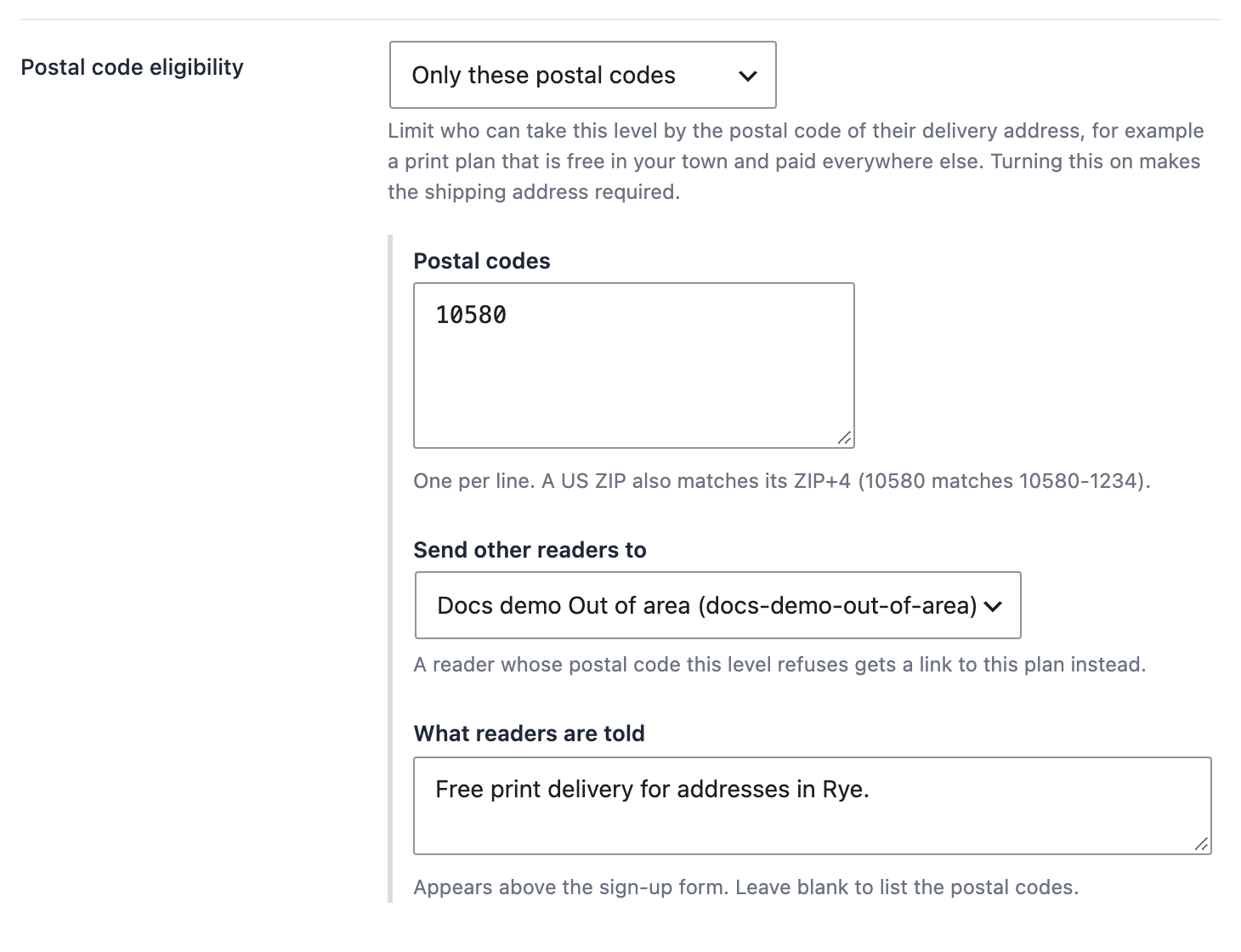
If you leave What readers are told blank, readers see a line that lists your codes, for example “This plan is for delivery addresses in 10580.”
Set up the paid plan for everyone else
- Go back to PaywallProject → Levels and click Edit next to your paid plan.
- In the Access section, set Postal code eligibility to All postal codes except these.
- In Postal codes, type the same local codes.
- In Send other readers to, choose your free local plan. Now local readers who open the paid plan get a button to the free one.
- Optional: write your own line in What readers are told. If you leave it blank, readers see “This plan is for delivery addresses outside 10580.”
- Click Save level.
When you save a plan with postal codes, PaywallProject makes the shipping address required on that plan. That’s the address it checks. It also means you have every reader’s delivery address.
To turn the limit off again, set Postal code eligibility back to Any postal code.
What the reader sees
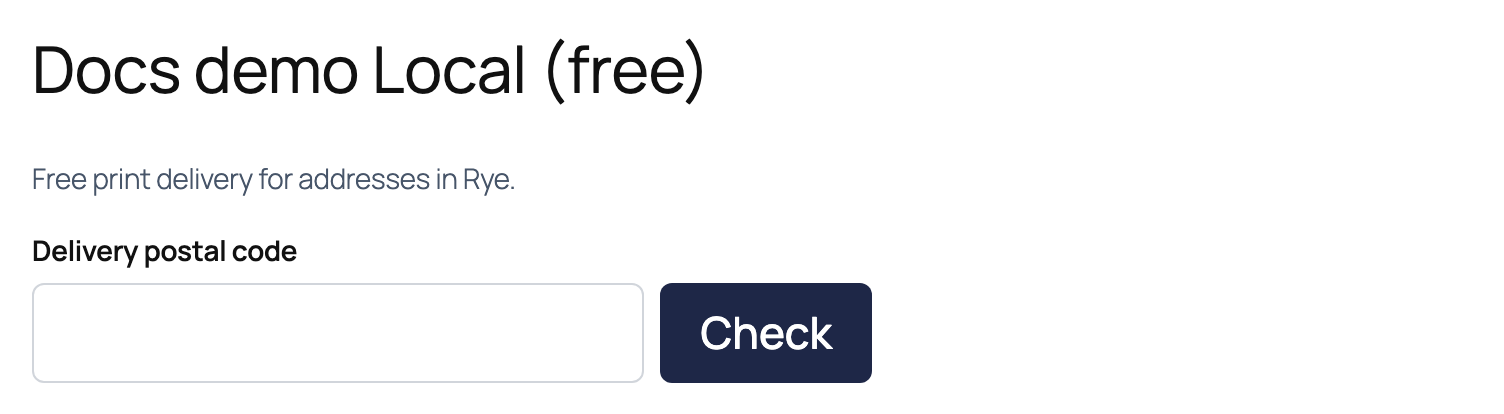
When a reader opens a plan with postal codes, they see your line and a Delivery postal code box. The rest of the form stays hidden until they click Check.
If the plan doesn’t take their code, the reader sees a message, for example “Local (free) is not available for this postal code.” Below it is a button to the other plan, such as Sign up for Out of area instead.
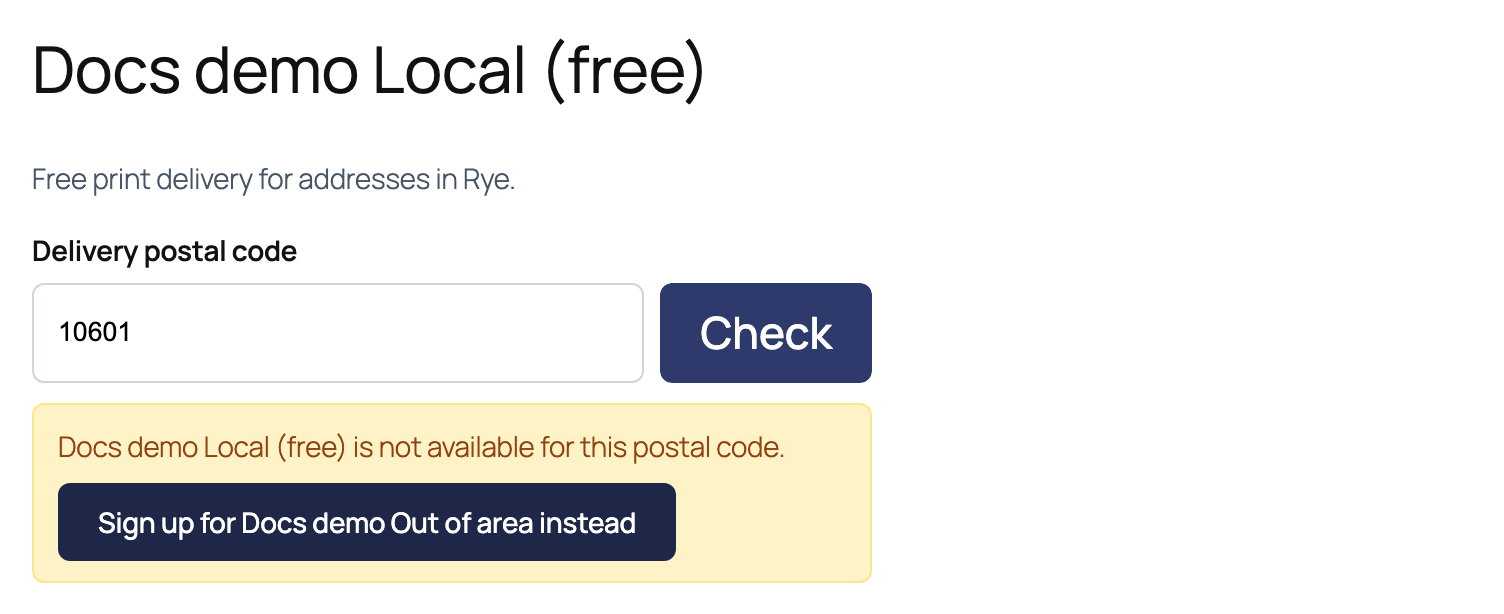
The button carries their postal code over. The paid plan already knows the code, so it skips the postal code step and opens the form with the code filled in.
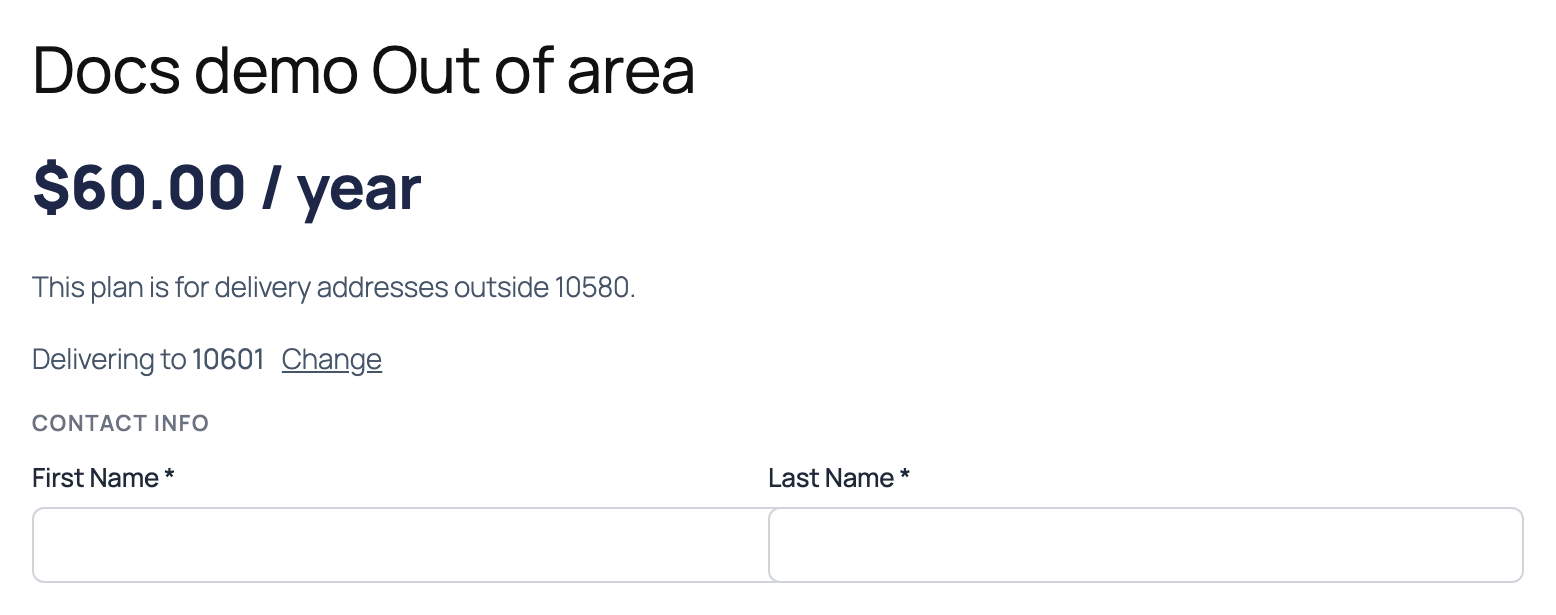
When the code is accepted, the form opens. A line at the top says Delivering to and the code, with a Change link. The code is already filled in under Postal code in the shipping address. The reader fills in the rest and signs up as usual.
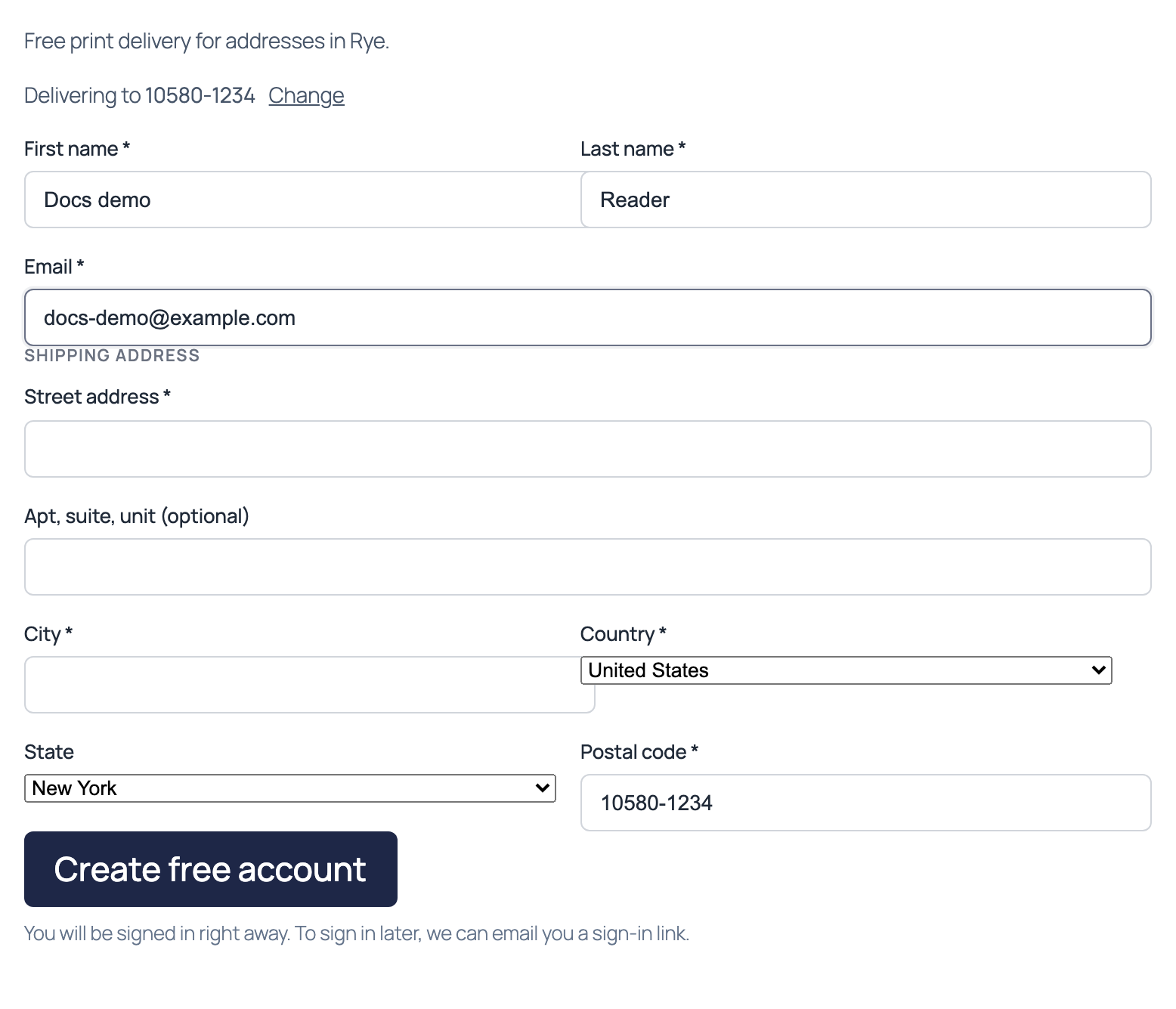
If the reader changes the postal code in the form to one the plan doesn’t take, a note with a link to the other plan appears under the field. If they submit anyway, the sign-up is refused. PaywallProject checks the code again when the form is sent, before any account or payment is created.
If you send readers to Stripe to pay
Some sites send readers to a Stripe page to pay instead of paying on your site. Stripe asks for the address on its own page, which is too late to check it. So on a plan with postal codes, your site asks for the Delivery postal code before the reader leaves for Stripe. That’s the code PaywallProject checks.
Plan changes
The check also applies when a subscriber switches plans from their account. PaywallProject uses the delivery address saved on their account. If that code isn’t allowed on the new plan, the change is refused. If the account has no delivery address, the change is refused too, with a message asking for the postal code.
How codes are matched
- ZIP+4 is covered. List the 5-digit ZIP. A reader who types
10580-1234matches10580. - Case and spaces don’t matter.
sw1a 1aaandSW1A1AAcount as the same code. - One code per line. Commas also work, for example
10580, 10573. Duplicates are removed when you save. - A blank code is refused on a plan with postal codes, in either mode. The reader is asked to enter one.
- No codes means no limit. If you choose Only these postal codes or All postal codes except these but leave the list empty, the plan stays open to everyone.
Good to know
- Gifts aren’t checked. Gift subscriptions don’t look at postal codes.
- You can always override it. When you put a subscriber on a plan yourself under PaywallProject → Subscribers, or bring readers in with an import, the postal code isn’t checked.
- Logged-in readers are checked too. The plan is for an address, not a person, so a reader who already has an account still needs an eligible code.
- The other plan must be active. If the plan you chose in Send other readers to is deleted, readers still see the message but no button.
- Existing subscribers keep their plan. Changing the codes doesn’t move or cancel anyone. It only affects new sign-ups and plan changes.
- Want to charge extra instead? If your local plan is paid too and you only want to add a delivery fee for out-of-area addresses, use the shipping surcharge in the level’s Checkout section. It’s there on recurring plans that collect a shipping address. Postal code eligibility is for when one plan should be free or closed to some addresses.