

When a paid subscription lapses, PaywallProject normally locks the reader out of everything the paid level gave them. Lapsed access lets those readers keep what a free level gets instead, so a reader whose card failed or who canceled still reads like a free member while you ask them to renew. Their subscription isn’t changed. They just aren’t locked out completely.
Who it covers
Lapsed access applies to signed-in readers who are on a paid level and whose subscription status is:
- Past due: a renewal payment failed and Stripe is still retrying it.
- Canceled: the subscription was canceled and has ended.
- Expired: the access period ran out without a renewal.
It doesn’t apply to readers on a free level, readers whose checkout isn’t finished, or visitors who aren’t signed in.
Before you start
- Lapsed access is off by default.
- You need at least one free level. Lapsed readers get exactly what that level’s Access settings allow. For example, if the free level allows 5 posts, lapsed readers can read 5 posts. If you don’t have a free level yet, create one under PaywallProject → Levels (see How to set up subscription levels).
Turn on lapsed access
- Go to PaywallProject → Restrictions.
- In the Lapsed access section, next to Free-level fallback, select Let past-due, canceled, or expired subscribers on a paid level see whatever a free level can access.
- Under Free level to mirror, choose the free level that lapsed readers should get.
- Select Save changes.
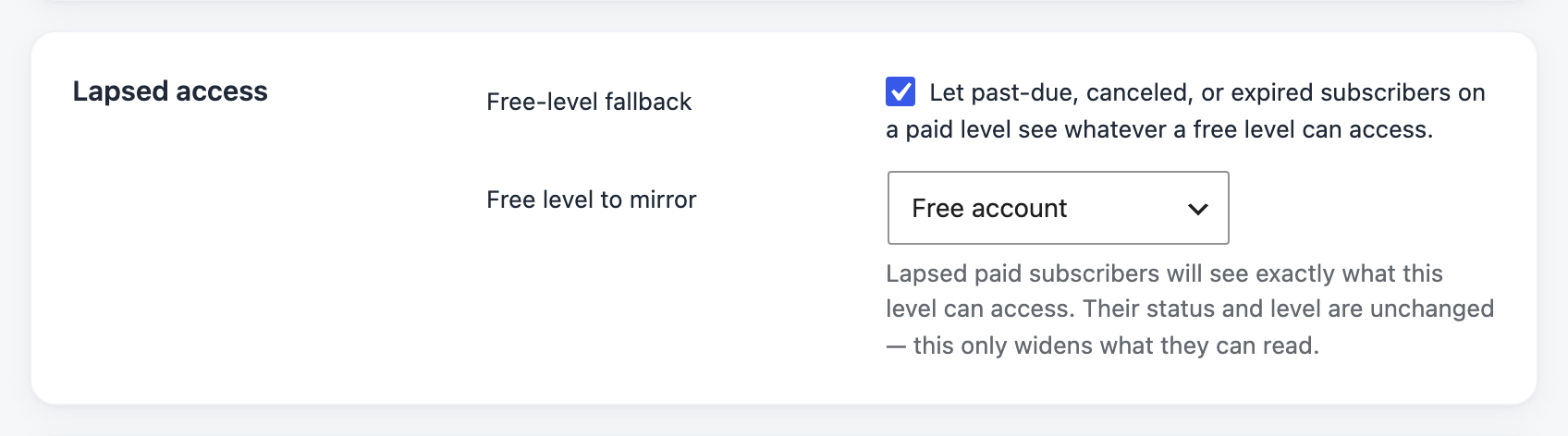
Lapsed access only works when both settings are set. If the checkbox is selected but no free level is chosen, lapsed readers stay locked out.
What lapsed readers see
On each article, PaywallProject checks what the free level you chose can access:
- The free level has unlimited access to the article: the article opens.
- The free level has a limit (for example, 5 posts): the reader can open articles until they reach that limit, then they see the paywall.
- The free level doesn’t cover the article: the reader is counted against your site-wide limit under Restriction rules, like any free member.
Articles set to Always require a subscription, or to specific paid levels, stay locked. When readers reach the paywall, they can renew as usual (see Cancel, resume or reactivate a subscription). As soon as they renew, their full paid access comes back.
Past-due readers
Without lapsed access, a past-due reader is blocked from every restricted article right away, even ones a free member could read. With lapsed access on, they read like a free member while Stripe retries the payment. Their renewal reminders and failed-payment emails still go out.
Good to know
- Nothing about the subscription changes. Readers keep their paid level and their Past due, Canceled or Expired status under Subscribers, in exports, in reports and in the Newsletter Glue sync. Lapsed access only changes what they can read.
- You can turn it off at any time. Lapsed readers go back to being locked out right away.
- Changing the free level’s Access settings also changes what lapsed readers can read.
- Group members still get their group’s access. If a reader’s own paid subscription lapsed but they’re an active member of a group whose owner is subscribed, they keep the owner’s level, not the free level.
- Let readers continue (under Never lock readers out on a level) follows the reader’s own paid level first. If that level has it off and the free level you chose has it on, lapsed readers get the free level’s “keep reading” link when they run out of articles.
- Lapsed readers have to be signed in. If they’re signed out, they’re treated like any other visitor.